

Introduction
Our API lets you integrate Sana into your existing platforms. We're still actively developing the API and will be adding more functionality as we go.
Authentication
Request Access Token
Use client credentials to request access tokens. All requests need to be authenticated using an access token.
The retrieved access token can authenticate requests using the authorization header
like Authorization: Bearer <accessToken>.
curl "https://<domain>.sana.ai/api/token" \
    -X POST \
    -H "Content-Type: application/x-www-form-urlencoded" \
    -d "grant_type=client_credentials&client_id=<client-id>&client_secret=<client-secret>&scope=read,write" \
The above command returns JSON structured like this:
{
  "data": {
    "accessToken": "<access-token>",
    "tokenType": "bearer",
    "expiresIn": 3600
  }
}
HTTP Request
POST https://<domain>.sana.ai/api/token
Body Parameters
| Parameter | Description |
|---|---|
| grant_type | Must be set to client_credentials |
| client_id | The ID of the client |
| client_secret | The secret of the client |
| scope | Comma-separated list of scopes. GET requests require read scope. POST, PATCH, and DELETE requests require write scope. |
Users
A user can be in 3 states in Sana.
| Parameter | Description |
|---|---|
| active | The user can login to Sana and use the platform |
| pending | The user has been added to Sana either through an invite, API or user provisioning flow, but the user hasn't completed the signed up. |
| disabled | The user is soft-deleted and cannot login to Sana |
In the following API responses
- If
disabledistrue, it means the user is de-activated - If
activatedAtfield is null, it means the user is inpendingstate - If
isSsoEmailfield is true, user e-mail matches suffixes configured for organization SSO configuration. - If
lastInviteSentAtfield is null, no user invitation e-mail has been sent. - The
typefield is one ofstandard,scormorguest. Some operations are only valid forstandardusers (for example, access roles cannot be assigned to non-standard users).
List All Users
curl "https://<domain>.sana.ai/api/v0/users?limit=1" \
  -H "Authorization: Bearer <accessToken>"
The above command returns JSON structured like this:
{
  "data": [
    {
      "id": "eb87a2dc-3e78-4d0b-b868-9d3f49c64f68",
      "email": "sana@sanalabs.com",
      "firstName": "Sana",
      "lastName": "Banana",
      "role": "learner",
      "disabled": false,
      "status": "active",
      "type": "standard",
      "customAttributes": {},
      "createdAt": "2023-02-21T13:00:11.851167Z",
      "activatedAt": "2023-02-22T13:00:10.342157Z",
      "lastInviteSentAt": null,
      "isSsoEmail": true,
      "isManager": false,
      "accessRole": null
    }
  ],
  "links": {
    "next": "https://<domain>.sana.ai/api/v0/users?next=9399b472-199b-4d18-97d9-819c7e1bf22f&limit=1"
  },
  "error": null
}
This endpoint retrieves all users
HTTP Request
GET https://<domain>.sana.ai/api/v0/users
Query Parameters
| Parameter | Type | Required | Default | Description |
|---|---|---|---|---|
| next | String | No | - | Set to fetch the next batch of users. |
| limit | Integer | No | 100 | The number of users to return. Max: 1000 |
| createdAfter | Date | No | - | Specify to fetch users created after this date (format: 2023-05-31) |
| String | No | - | Email address to filter users. |
Get a User
curl "https://<domain>.sana.ai/api/v0/users/eb87a2dc-3e78-4d0b-b868-9d3f49c64f68" \
  -H "Authorization: Bearer <accessToken>"
The above command returns JSON structured like this:
{
  "data": {
    "id": "eb87a2dc-3e78-4d0b-b868-9d3f49c64f68",
    "email": "sana@sanalabs.com",
    "firstName": "Sana",
    "lastName": "Banana",
    "role": "learner",
    "disabled": false,
    "status": "active",
    "type": "standard",
    "customAttributes": {},
    "createdAt": "2023-02-21T13:00:11.851167Z",
    "activatedAt": "2023-02-22T13:00:10.342157Z",
    "lastInviteSentAt": "2023-02-21T13:00:11.871360Z",
    "isSsoEmail": true,
    "isManager": false,
    "accessRole": null
  },
  "error": null
}
This endpoint retrieves a specific user
HTTP Request
GET https://<domain>.sana.ai/api/v0/users/<userId>
URL Parameters
| Parameter | Type | Description |
|---|---|---|
| userId | String | The ID of the user to retrieve |
Create a User
curl "https://<domain>.sana.ai/api/v0/users" \
  -X POST \
  -H "Content-Type: application/json" \
  -H "Authorization: Bearer <accessToken>" \
  -d '{
        "user": {
            "email": "sana@sanalabs.com",
            "firstName": "Sana",
            "lastName": "Banana",
            "language": "en"
        }
      }'
The above command returns JSON structured like this:
{
  "data": {
    "id": "eb87a2dc-3e78-4d0b-b868-9d3f49c64f68",
    "email": "sana@sanalabs.com",
    "firstName": "Sana",
    "lastName": "Banana",
    "role": "learner",
    "status": "pending",
    "language": "en",
    "inviteLink": "https://<domain>.sana.ai/accept-invite?inviteCode=<code>",
    "customAttributes": {},
    "createdAt": "2023-02-21T13:00:11.851167Z",
    "activatedAt": null
  },
  "error": null
}
The
inviteLinkshould be sent to the user to complete the sign up
This endpoint creates a user
HTTP Request
POST https://<domain>.sana.ai/api/v0/users
Body Parameters
| Parameter | Type | Required | Default | Description |
|---|---|---|---|---|
| String | Yes | - | The user's email address | |
| firstName | String | No | - | The first name of the user |
| lastName | String | No | - | The last name of the user |
| role | String | No | - | One of learner, group-admin or admin |
| language | String | No | - | A language tag (IETF BCP 47) supported by your organization. |
| customAttributes | Map<String, String> | No | - | For storing arbitrary key/value pairs. The keyset needs to be pre-configured. |
Send invite
curl "https://<domain>.sana.ai/api/v0/users/<userId>/send-invite" \
  -X POST \
  -H "Content-Type: application/json" \
  -H "Authorization: Bearer <accessToken>"
This endpoint will generate a new invite link and send it to the user. Calling this endpoint will invalidate the previous invite links.
If called after a user has accepted the invite the request will be rejected.
The endpoint can also reject requests if called too often to prevent sending multiple emails to the same user.
HTTP Request
POST https://<domain>.sana.ai/api/v0/users/<userId>/send-invite
Generate new invite link
curl "https://<domain>.sana.ai/api/v0/users/<userId>/invite-link" \
  -X POST \
  -H "Content-Type: application/json" \
  -H "Authorization: Bearer <accessToken>"
Calling this endpoint will invalidate the previous invite links.
If called after a user has accepted the invite the request will be rejected.
HTTP Request
POST https://<domain>.sana.ai/api/v0/users/<userId>/invite-link
Update a User
curl "https://<domain>.sana.ai/api/v0/users/eb87a2dc-3e78-4d0b-b868-9d3f49c64f68" \
  -X PATCH \
  -H "Content-Type: application/json" \
  -H "Authorization: Bearer <accessToken>" \
  -d '{
        "user": {
          "lastName": "Apple"
        }
      }'
⚠️ If you are updating
customAttributes: the field does not support merge logic, you need to add the entire expected object in the patch request.The above command returns JSON structured like this:
{
  "data": {
    "id": "eb87a2dc-3e78-4d0b-b868-9d3f49c64f68",
    "email": "sana@sanalabs.com",
    "firstName": "Sana",
    "lastName": "Apple",
    "role": "learner",
    "disabled": false,
    "status": "active",
    "type": "standard",
    "language": null,
    "customAttributes": {},
    "createdAt": "2023-02-21T13:00:11.851167Z",
    "activatedAt": "2023-02-22T13:00:10.342157Z",
    "lastInviteSentAt": null,
    "isSsoEmail": true,
    "isManager": false
  },
  "error": null
}
This endpoint updates a specific user.
A user account can be deactivated by setting disabled = true. This operation can be reversed to reactivate an account
by setting disabled = false.
HTTP Request
PATCH https://<domain>.sana.ai/api/v0/users/<userId>
URL Parameters
| Parameter | Type | Description |
|---|---|---|
| userId | String | The ID of the user to update |
Body Parameters
| Parameter | Type | Required | Default | Description |
|---|---|---|---|---|
| String | No | - | The user's email address | |
| firstName | String | No | - | The first name of the user |
| lastName | String | No | - | The last name of the user |
| disabled | Boolean | No | - | If set to true the account is deactivated. If set to false the account is reactivated. |
| role | String | No | - | One of learner, group-admin or admin |
| language | String | No | - | A language tag (IETF BCP 47) supported by your organization. |
| customAttributes | Map |
No | - | For storing arbitrary key/value pairs. The keyset needs to be pre-configured. |
Delete a User
curl "https://<domain>.sana.ai/api/v0/users/eb87a2dc-3e78-4d0b-b868-9d3f49c64f68" \
  -X DELETE \
  -H "Authorization: Bearer <accessToken>"
This endpoint deletes a specific user.
HTTP Request
DELETE https://<domain>.sana.ai/api/v0/users/<userId>
URL Parameters
| Parameter | Type | Description |
|---|---|---|
| userId | String | The ID of the user to delete |
List All Groups for a User
curl "https://<domain>.sana.ai/api/v0/users/eb87a2dc-3e78-4d0b-b868-9d3f49c64f68/groups?limit=1" \
  -H "Authorization: Bearer <accessToken>"
The above command returns JSON structured like this:
{
  "data": [
    {
      "id": "b3a96b74-1b2e-49da-b5d8-bfa7c7b800be",
      "role": "learner"
    }
  ],
  "links": {
    "next": "https://<domain>.sana.ai/api/v0/users/eb87a2dc-3e78-4d0b-b868-9d3f49c64f68/groups?next=5f4818ba-16d1-43c0-8421-4a1782a999a1&limit=1"
  },
  "error": null
}
This endpoint retrieves all groups in a specific user
HTTP Request
GET https://<domain>.sana.ai/api/v0/users/<userId>/groups
URL Parameters
| Parameter | Description |
|---|---|
| userId | The ID of the user |
Query Parameters
| Parameter | Type | Required | Default | Description |
|---|---|---|---|---|
| next | String | No | - | Set to fetch the next batch of groups. |
| limit | Integer | No | 100 | The number of groups to return. Max: 1000 |
Set user's manager
curl "https://<domain>.sana.ai/api/v0/users/eb87a2dc-3e78-4d0b-b868-9d3f49c64f68/manager/0e9e5c2e-5db4-42e7-a4ed-0d8aebe23094" \
  -X PUT \
  -H "Authorization: Bearer <accessToken>"
This endpoint sets the user's manager.
Cycles in user manager relationships are not allowed. The request that closes a cycle will be rejected.
HTTP Request
PUT https://<domain>.sana.ai/api/v0/users/<userId>/manager/<managerId>
Delete user's manager
curl "https://<domain>.sana.ai/api/v0/users/eb87a2dc-3e78-4d0b-b868-9d3f49c64f68/manager" \
  -X DELETE \
  -H "Authorization: Bearer <accessToken>"
This endpoint deletes the user's manager.
HTTP Request
DELETE https://<domain>.sana.ai/api/v0/users/<userId>/manager
List User Attribute Schema
curl "https://<domain>.sana.ai/api/v0/users/attributes-schema" \
  -H "Authorization: Bearer <accessToken>"
The above command returns JSON structured like this:
{
  "data": {
    "attributes": [
      {
        "key": "department",
        "displayName": "Department",
        "type": "enum",
        "mandatory": true,
        "allowMultiSelect": true,
        "options": [
          { "value": "eng", "displayName": "Engineering" },
          { "value": "sales", "displayName": "Sales" }
        ],
        "format": null
      },
      {
        "key": "hireDate",
        "displayName": "Hire date",
        "type": "date",
        "mandatory": false,
        "allowMultiSelect": false,
        "options": null,
        "format": "dd/MM/yyyy"
      },
      {
        "key": "employeeId",
        "displayName": "Employee ID",
        "type": "string",
        "mandatory": false,
        "allowMultiSelect": false,
        "options": null,
        "format": null
      }
    ]
  },
  "error": null
}
This endpoint returns the organization's custom user-attribute schema: every attribute the org has
configured, so an integration can validate its full attribute config in a single request. type is one
of string, integer, date, or enum. options is populated only for enum attributes. For date
attributes, format is the date pattern that writes must match (e.g. dd/MM/yyyy); null means the
default ISO format yyyy-MM-dd.
HTTP Request
GET https://<domain>.sana.ai/api/v0/users/attributes-schema
Groups
List All Groups
curl "https://<domain>.sana.ai/api/v0/groups?limit=1" \
  -H "Authorization: Bearer <accessToken>"
The above command returns JSON structured like this:
{
  "data": [
    {
      "id": "237484cd-098e-477d-80d6-c5ce655fbef7",
      "name": "UI group",
      "type": "user_manual"
    },
    {
      "id": "b3a96b74-1b2e-49da-b5d8-bfa7c7b800be",
      "name": "API group",
      "type": "user"
    },
    {
      "id": "2dac5403-9723-4534-ad01-9750cd13b230",
      "name": "Another API group",
      "type": "user"
    }
  ],

  "links": {
    "next": "https://<domain>.sana.ai/api/v0/groups?next=5f4818ba-16d1-43c0-8421-4a1782a999a1&limit=1"
  },
  "error": null
}
This endpoint retrieves all groups.
HTTP Request
GET https://<domain>.sana.ai/api/v0/groups
Query Parameters
| Parameter | Type | Required | Default | Description |
|---|---|---|---|---|
| next | String | No | - | Set to fetch the next batch of groups. |
| limit | Integer | No | 100 | The number of groups to return. Max: 1000 |
Get a Group
curl "https://<domain>.sana.ai/api/v0/groups/b3a96b74-1b2e-49da-b5d8-bfa7c7b800be" \
  -H "Authorization: Bearer <accessToken>"
The above command returns JSON structured like this:
{
  "data": {
    "id": "d3846c40-4005-439d-b945-82868e9965f7",
    "name": "marketing group",
    "type": "user"
  },
  "links": null,
  "error": null
}
This endpoint retrieves a specific group
HTTP Request
GET https://<domain>.sana.ai/api/v0/groups/<groupId>
URL Parameters
| Parameter | Description |
|---|---|
| groupId | The ID of the group to retrieve |
Create a Group
curl "https://<domain>.sana.ai/api/v0/groups" \
  -X POST \
  -H "Content-Type: application/json" \
  -H "Authorization: Bearer <accessToken>" \
  -d '{
        "group": {
          "name": "Fruits",
          "type": "user"
        }
      }'
The above command returns JSON structured like this:
{
  "data": {
    "id": "b3a96b74-1b2e-49da-b5d8-bfa7c7b800be",
    "name": "Fruits",
    "type": "user"
  },
  "error": null
}
This endpoint creates a group.
Note: The type attribute is disabled by default, once enabled existing groups will be of type program.
HTTP Request
POST https://<domain>.sana.ai/api/v0/groups
Body Parameters
| Parameter | Type | Required | Default | Description |
|---|---|---|---|---|
| name | String | Yes | - | The name of the group |
| type | Enum | No | program | Type of group: program, user, user_manual |
Update a Group
curl "https://<domain>.sana.ai/api/v0/groups/b3a96b74-1b2e-49da-b5d8-bfa7c7b800be" \
  -X PATCH \
  -H "Content-Type: application/json" \
  -H "Authorization: Bearer <accessToken>" \
  -d '{
        "group": {
          "name": "Fruit Loops"
        }
      }'
The above command returns JSON structured like this:
{
  "data": {
    "id": "b3a96b74-1b2e-49da-b5d8-bfa7c7b800be",
    "name": "The Fruit Loops",
    "type": "program"
  },
  "error": null
}
This endpoint updates a specific group
Note: Only groups with type user can be updated via the API.
HTTP Request
PATCH https://<domain>.sana.ai/api/v0/groups/<groupId>
URL Parameters
| Parameter | Type | Description |
|---|---|---|
| groupId | String | The ID of the group to update |
Body Parameters
| Parameter | Type | Required | Default | Description |
|---|---|---|---|---|
| name | String | No | - | The name of the group |
Delete a Group
curl "https://<domain>.sana.ai/api/v0/groups/b3a96b74-1b2e-49da-b5d8-bfa7c7b800be" \
  -X DELETE \
  -H "Authorization: Bearer <accessToken>"
This endpoint deletes a specific group
HTTP Request
DELETE https://<domain>.sana.ai/api/v0/groups/<groupId>
URL Parameters
| Parameter | Description |
|---|---|
| groupId | The ID of the group to delete |
List All Users in a Group
curl "https://<domain>.sana.ai/api/v0/groups/b3a96b74-1b2e-49da-b5d8-bfa7c7b800be/users?limit=1" \
  -H "Authorization: Bearer <accessToken>"
The above command returns JSON structured like this:
{
  "data": [
    {
      "id": "eb87a2dc-3e78-4d0b-b868-9d3f49c64f68",
      "role": "learner"
    }
  ],
  "links": {
    "next": "https://<domain>.sana.ai/api/v0/groups/b3a96b74-1b2e-49da-b5d8-bfa7c7b800be/users?next=9399b472-199b-4d18-97d9-819c7e1bf22f&limit=1"
  },
  "error": null
}
This endpoint retrieves all users in a specific group
HTTP Request
GET https://<domain>.sana.ai/api/v0/groups/<groupId>/users
URL Parameters
| Parameter | Description |
|---|---|
| groupId | The ID of the group |
Query Parameters
| Parameter | Type | Required | Default | Description |
|---|---|---|---|---|
| next | String | No | - | Set to fetch the next batch of users. |
| limit | Integer | No | 100 | The number of users to return. Max: 1000 |
Add Users to a Group
curl "https://<domain>.sana.ai/api/v0/groups/b3a96b74-1b2e-49da-b5d8-bfa7c7b800be/users" \
  -X POST \
  -H "Content-Type: application/json" \
  -H "Authorization: Bearer <accessToken>" \
  -d '{
        "users": [
          {
            "id": "eb87a2dc-3e78-4d0b-b868-9d3f49c64f68",
            "role": "learner"
          }
        ]
      }'
This endpoint adds users to a specific group
HTTP Request
POST https://<domain>.sana.ai/api/v0/groups/<groupId>/users
URL Parameters
| Parameter | Description |
|---|---|
| groupId | The ID of the group |
Body Parameters
| Parameter | Type | Required | Default | Description |
|---|---|---|---|---|
| id | String | Yes | - | The ID of the user to add |
| role | String | Yes | - | The user's role in the group. One of learner, group-admin. |
Update a User in a Group
curl "https://<domain>.sana.ai/api/v0/groups/b3a96b74-1b2e-49da-b5d8-bfa7c7b800be/users/eb87a2dc-3e78-4d0b-b868-9d3f49c64f68" \
  -X PATCH \
  -H "Content-Type: application/json" \
  -H "Authorization: Bearer <accessToken>" \
  -d '{
        "user": {
          "role": "group-admin"
        }
      }'
This endpoint updates a user in a group
HTTP Request
PATCH https://<domain>.sana.ai/api/v0/groups/<groupId>/users/<userId>
URL Parameters
| Parameter | Description |
|---|---|
| groupId | The ID of the group |
| userId | The ID of the user |
Body Parameters
| Parameter | Type | Required | Default | Description |
|---|---|---|---|---|
| role | String | No | - | The user's role in the group. One of learner, group-admin. |
Delete a User from a Group
curl "https://<domain>.sana.ai/api/v0/groups/b3a96b74-1b2e-49da-b5d8-bfa7c7b800be/users/eb87a2dc-3e78-4d0b-b868-9d3f49c64f68" \
  -X DELETE \
  -H "Authorization: Bearer <accessToken>"
This endpoint deletes a user from a specific group
HTTP Request
DELETE https://<domain>.sana.ai/api/v0/groups/<groupId>/users/<userId>
URL Parameters
| Parameter | Description |
|---|---|
| groupId | The ID of the group |
| userId | The ID of the user |
Programs
List All Programs
curl "https://<domain>.sana.ai/api/v0/programs?limit=1" \
  -H "Authorization: Bearer <accessToken>"
The above command returns JSON structured like this:
{
  "data": [
    {
      "id": "237484cd-098e-477d-80d6-c5ce655fbef7",
      "name": "Sales program",
      "description": "A program containing a selection of courses for sales.",
      "selfEnrollmentEnabled": true,
      "imageUrl": "https://image-storage-bucket.com/sales_program_thumbnail.png"
    }
  ],
  "links": {
    "next": "https://<domain>.sana.ai/api/v0/programs?next=2dac5403-9723-4534-ad01-9750cd13b230&limit=1"
  },
  "error": null
}
This endpoint retrieves all programs.
HTTP Request
GET https://<domain>.sana.ai/api/v0/programs
Query Parameters
| Parameter | Type | Required | Default | Description |
|---|---|---|---|---|
| next | String | No | - | Set to fetch the next batch of programs. |
| limit | Integer | No | 100 | The number of programs to return. Max: 1000 |
| onlyWithSelfEnrollment | Boolean | No | true | List only programs with self-enrollment. |
Get a Program
curl "https://<domain>.sana.ai/api/v0/programs/237484cd-098e-477d-80d6-c5ce655fbef7" \
  -H "Authorization: Bearer <accessToken>"
The above command returns JSON structured like this:
{
  "data": {
    "id": "237484cd-098e-477d-80d6-c5ce655fbef7",
    "name": "Sales program",
    "description": "A program containing a selection of courses for sales.",
    "selfEnrollmentEnabled": true,
    "imageUrl": "https://image-storage-bucket.com/sales_program_thumbnail.png"
  },
  "links": null,
  "error": null
}
This endpoint retrieves a specific program.
HTTP Request
GET https://<domain>.sana.ai/api/v0/programs/<programId>
URL Parameters
| Parameter | Description |
|---|---|
| programId | The ID of the program to retrieve |
Create a Program
curl "https://<domain>.sana.ai/api/v0/programs" \
  -X POST \
  -H "Content-Type: application/json" \
  -H "Authorization: Bearer <accessToken>" \
  -d '{
        "program": {
          "name": "Sales program",
          "description": "A program containing a selection of courses for sales.",
          "selfEnrollmentEnabled": true,
          "imageUrl": "https://external-storage.com/image.png"
        }
      }'
The above command returns JSON structured like this. Note the changed image URL, which is now hosted at our internal bucket.
{
  "data": {
    "id": "237484cd-098e-477d-80d6-c5ce655fbef7",
    "name": "Sales program",
    "description": "A program containing a selection of courses for sales.",
    "selfEnrollmentEnabled": true,
    "imageUrl": "https://image-storage-bucket.com/sales_program_thumbnail.png"
  },
  "error": null
}
This endpoint creates a program.
HTTP Request
POST https://<domain>.sana.ai/api/v0/programs
Body Parameters
| Parameter | Type | Required | Default | Description |
|---|---|---|---|---|
| name | String | Yes | - | The name of the program |
| description | String | No | - | Description of the program |
| selfEnrollmentEnabled | Boolean | No | false | Whether to allow self-enrollment |
| imageUrl | String | No | - | URL of the thumbnail image |
Update a Program
curl "https://<domain>.sana.ai/api/v0/programs/237484cd-098e-477d-80d6-c5ce655fbef7" \
  -X PATCH \
  -H "Content-Type: application/json" \
  -H "Authorization: Bearer <accessToken>" \
  -d '{
        "program": {
          "name": "Better sales program",
          "description": "A better program containing a selection of courses for sales.",
          "selfEnrollmentEnabled": true,
          "imageUrl": "https://external-storage.com/better_image.png"
        }
      }'
The above command returns JSON structured like this. Note the changed image URL, which is now hosted at our internal bucket.
{
  "data": {
    "id": "237484cd-098e-477d-80d6-c5ce655fbef7",
    "name": "Better sales program",
    "description": "A better program containing a selection of courses for sales.",
    "selfEnrollmentEnabled": true,
    "imageUrl": "https://image-storage-bucket.com/better_sales_program_thumbnail.png"
  },
  "error": null
}
This endpoint updates a program.
HTTP Request
PATCH https://<domain>.sana.ai/api/v0/programs/<programId>
URL Parameters
| Parameter | Type | Description |
|---|---|---|
| programId | String | The ID of the program to update |
Body Parameters
| Parameter | Type | Required | Default | Description |
|---|---|---|---|---|
| name | String | No | - | The name of the program |
| description | String | No | - | Description of the program |
| selfEnrollmentEnabled | Boolean | No | false | Whether to allow self-enrollment |
| imageUrl | String | No | - | URL of the thumbnail image |
Delete a Program
curl "https://<domain>.sana.ai/api/v0/programs/237484cd-098e-477d-80d6-c5ce655fbef7" \
  -X DELETE \
  -H "Authorization: Bearer <accessToken>"
This endpoint deletes a specific program. For security purposes, only programs created via the public API can be deleted with this method.
HTTP Request
DELETE https://<domain>.sana.ai/api/v0/programs/<programId>
URL Parameters
| Parameter | Description |
|---|---|
| programId | The ID of the program to delete |
Enroll a user to a Program (create membership)
curl "https://<domain>.sana.ai/api/v0/programs/e73e8237-fc8e-4380-bf00-33367c331f81/members" \
  -X POST \
  -H "Content-Type: application/json" \
  -H "Authorization: Bearer <accessToken>" \
  -d '{ "memberships": [ { "userId": "b48fcf4b-1973-40e6-b908-3cad34206789", "availableAt": "2025-05-20", "required": true }] }'
This endpoint enrolls a list of individual users to a program (creates program memberships).
HTTP Request
POST https://<domain>.sana.ai/api/v0/programs/<programId>/members
URL Parameters
| Parameter | Description |
|---|---|
| programId | The ID of the program to update with new members |
Body Parameters
| Parameter | Type | Required | Default | Description |
|---|---|---|---|---|
| memberships.userId | String | Yes | - | User ID |
| memberships.availableAt | LocalDate | No | Now | Start date for the membership |
| memberships.required | Boolean | No | False | Mark the program as required for the user |
| skipNotifications | Boolean | No | False | If true, no notifications are sent |
Unenroll a user from a Program (delete membership)
curl "https://<domain>.sana.ai/api/v0/programs/e73e8237-fc8e-4380-bf00-33367c331f81/members" \
  -X DELETE \
  -H "Content-Type: application/json" \
  -H "Authorization: Bearer <accessToken>" \
  -d '{ "userIds": [ "b48fcf4b-1973-40e6-b908-3cad34206789" ] }'
This endpoint unenrolls a list of individual users from a program (deletes program memberships).
HTTP Request
DELETE https://<domain>.sana.ai/api/v0/programs/<programId>/members
URL Parameters
| Parameter | Description |
|---|---|
| programId | The ID of the program to delete members from |
Body Parameters
| Parameter | Type | Required | Default | Description |
|---|---|---|---|---|
| userIds | String[] | Yes | - | IDs of the users to unenroll from the program |
Assignments
An assignment is a relationship between a content entity and an identity entity.
Currently the only supported content entity is course and the supported identity entities are user and group. More
entities should be expected in the future.
New entities can be introduced with short notice and this needs to be considered when parsing this data.
List user assignments
curl "https://<domain>.sana.ai/api/v0/users/bdaf7ff4-c665-4f1c-8e7b-1ca7fcca5277/assignments" \
  -H "Authorization: Bearer <accessToken>"
The above command returns JSON structured like this:
{
  "data": [
    {
      "content": {
        "type": "course",
        "id": "bdBUCzdWq3CK"
      },
      "identity": {
        "type": "user",
        "id": "bdaf7ff4-c665-4f1c-8e7b-1ca7fcca5277"
      },
      "status": {
        "completed": false
      },
      "assignmentTime": null,
      "passedTime": null,
      "dueDateAbsolute": null,
      "isRequired": false
    },
    {
      "content": {
        "type": "course",
        "id": "c4etyA_7VGq4"
      },
      "identity": {
        "type": "program",
        "id": "1f1ee52d-492b-4003-afa6-0b80a2259ceb"
      },
      "status": {
        "completed": true
      },
      "assignmentTime": "2020-12-15T18:40:53.553743439Z",
      "passedTime": "2021-12-15T18:40:53.553743439Z",
      "dueDateAbsolute": "2024-03-05",
      "isRequired": true
    }
  ]
}
This endpoint lists the assignments for a user.
A user can have many assignments for the same content.
This is because a user can be assigned content through a program which they are a member of.
For this reason content should not be considered to be a unique value in the list.
A user assignment through a program can be identified by identity where type=program and id is the program's ID.
HTTP Request
GET https://<domain>.sana.ai/api/v0/users/<userId>/assignments
Query Parameters
| Parameter | Type | Required | Default | Description |
|---|---|---|---|---|
| contentType | String | No | - | Filter assignments using content types. Allowed values: course |
| identityType | String | No | - | Filter assignments using identity types. Allowed values: user, program |
URL Parameters
| Parameter | Description |
|---|---|
| userId | The ID of the user |
Assign content to a user
curl "https://<domain>.sana.ai/api/v0/users/bdaf7ff4-c665-4f1c-8e7b-1ca7fcca5277/assignments" \
  -X POST \
  -H "Content-Type: application/json" \
  -H "Authorization: Bearer <accessToken>" \
  -d '{ "assignments": [{ "type": "course", "id": "c4etyA_7VGq4", "isRequired": true }], "dueDateAbsolute": "2024-03-01" }'
This endpoint assigns content to the user
HTTP Request
POST https://<domain>.sana.ai/api/v0/users/<userId>/assignments
Body Parameters
| Parameter | Type | Required | Default | Description |
|---|---|---|---|---|
| assignments.type | String | Yes | - | The content type. Possible values: course |
| assignments.id | String | Yes | - | The content ID |
| assignments.isRequired | Boolean | No | false | Mark course assignment as required |
| dueDateAbsolute | LocalDate | No | - | Due date for assignment |
| avoidNotifications | Boolean | No | False | Do not send assignment notifications |
URL Parameters
| Parameter | Description |
|---|---|
| userId | The ID of the user |
Delete an assignment from a user
curl "https://<domain>.sana.ai/api/v0/users/bdaf7ff4-c665-4f1c-8e7b-1ca7fcca5277/assignments" \
  -H "Authorization: Bearer <accessToken>" \
  -X DELETE \
  -d '{ "assignments": [{ "type": "course", "id": "c4etyA_7VGq4" }] }'
This endpoint deletes an assignment from the user.
HTTP Request
DELETE https://<domain>.sana.ai/api/v0/users/<userId>/assignments
Body Parameters
| Parameter | Type | Required | Default | Description |
|---|---|---|---|---|
| assignments.type | String | Yes | - | The content type. Possible values: course |
| assignments.id | String | Yes | - | The content ID |
URL Parameters
| Parameter | Description |
|---|---|
| userId | The ID of the user |
Courses
List Courses
curl "https://<domain>.sana.ai/api/v0/courses" \
  -H "Authorization: Bearer <accessToken>"
The above command returns JSON structured like this:
{
  "data": [
    {
      "id": "5_dl6jHhI78o",
      "title": "Agile Project Management",
      "description": "Agile is an approach to project management...",
      "imageUrl": "https://...",
      "durationMinutes": 15,
      "type": "live",
      "externalId": "123456",
      "link": null,
      "level": null,
      "tags": ["agile", "project management"],
      "contentAttributes": {
        "customAttributes": [],
        "categoryIds": []
      },
      "defaultDuration": false
    }
  ]
}
This endpoint lists the published courses.
HTTP Request
GET https://<domain>.sana.ai/api/v0/courses
Query Parameters
| Parameter | Type | Required | Default | Description |
|---|---|---|---|---|
| next | String | No | - | Set to fetch the next batch of courses. |
| limit | Integer | No | 100 | The number of courses to return. Max: 1000 |
| externalId | String | No | - | Set to fetch the course with matching external identifier. |
Get a Course
curl "https://<domain>.sana.ai/api/v0/courses/5_dl6jHhI78o" \
  -H "Authorization: Bearer <accessToken>"
The above command returns JSON structured like this:
{
  "data": {
    "id": "5_dl6jHhI78o",
    "title": "Agile Project Management",
    "description": "Agile is an approach to project management...",
    "imageUrl": "https://...",
    "durationMinutes": 15,
    "type": "live",
    "externalId": "123456",
    "link": null,
    "level": null,
    "tags": ["agile", "project management"],
    "contentAttributes": {
      "customAttributes": [
        {
          "attributeId": "1c95bf27-6996-4138-94f9-3551b0198925",
          "values": [
            "Hej"
          ]
        }
      ],
      "categoryIds": [
        "AUWQA2qCW8aG"
      ]
    },
    "defaultDuration": false
  }
}
This endpoint returns a specific course.
HTTP Request
GET https://<domain>.sana.ai/api/v0/courses/<courseId>
URL Parameters
| Parameter | Description |
|---|---|
| courseId | The ID of the course |
Create a link course
curl "https://<domain>.sana.ai/api/v0/courses" \
  -X POST \
  -H "Content-Type: application/json" \
  -H "Authorization: Bearer <accessToken>" \
  -d '{
          "course": {
            "title": "QA Basics",
            "description": "This is a link course...",
            "durationInMinutes": 14,
            "link": "https://docs.google.com/presentation/d/160a2j5_hsD0np0DOOxP-Lno_hc9V3celMfyD42t8z2o/edit?usp=sharing",
            "externalId": "123456"
          }
        }'
This endpoint create a link course
HTTP Request
POST https://<domain>.sana.ai/api/v0/courses
Body Parameters
| Parameter | Type | Required | Default | Description |
|---|---|---|---|---|
| title | String | Yes | - | Title of the course |
| description | String | No | - | Description of the course |
| link | String | Yes | - | Link pointing to the course |
| durationInMinutes | Int | No | - | Can specify duration of the course. Set to default interval when not specified |
| imageUrl | String | No | - | URL for an image that is shown for the course. |
| level | String | No | - | One of beginner, intermediate or expert. |
| externalId | String | No | - | External identifier, must be a unique value |
| visibility | String or Object | No | - | One of: private, visible-in-manage, public, or {"type": "user-groups", "groups": ["<group-uuid>", ...]} for group-specific visibility |
Create a course [v1]
curl "https://<domain>.sana.ai/api/v1/courses" \
  -X POST \
  -H "Content-Type: application/json" \
  -H "Authorization: Bearer <accessToken>" \
  -d '{
        "course": {
              "title": "QA Basics",
              "courseType": {
                "type": "SelfPaced",
                "publish": true,
                "ownerUserID": "550e8400-e29b-41d4-a716-446655440000"
              },
              "description": "This is a self-paced course...",
              "visibility": "public"
         }
       }'

curl "https://<domain>.sana.ai/api/v1/courses" \
  -X POST \
  -H "Content-Type: application/json" \
  -H "Authorization: Bearer <accessToken>" \
  -d '{
        "course": {
             "title": "QA Basics",
             "courseType": {
               "type": "Live",
               "ownerUserID": "123e4567-e89b-12d3-a456-426614174000"
             },
             "description": "This is a live course...",
             "durationInMinutes": 14,
             "visibility": "visible-in-manage"
         }
       }'
This endpoint create a course. Can be used to generate empty native self-paced as well as live courses.
HTTP Request
POST https://<domain>.sana.ai/api/v1/courses
Body Parameters
| Parameter | Type | Required | Default | Description |
|---|---|---|---|---|
| title | String | Yes | - | Title of the course |
| description | String | No | - | Description of the course |
| durationInMinutes | Integer | No | - | Can specify duration of the course. |
| imageUrl | String (URL) | No | - | URL for an image that represents the course |
| level | String | No | - | One of beginner, intermediate, or expert |
| visibility | String or Object | Yes | - | One of: private, visible-in-manage, public, or {"type": "user-groups", "groups": ["<group-uuid>", ...]} for group-specific visibility |
| courseType | Object (OneOf) | Yes | - | The type of course. Must be one of Link, SelfPaced, or Live. |
courseType Variants
🔗 Link
| Field | Type | Required | Description |
|---|---|---|---|
| type | String | Yes | Must be "Link" |
| link | String | Yes | Link pointing to the course |
| externalId | String | No | External identifier, must be a unique value |
| linkSource | String | No | Optional source (e.g., "YouTube", "Slides") |
🧩 SelfPaced
| Field | Type | Required | Description |
|---|---|---|---|
| type | String | Yes | Must be "SelfPaced" |
| publish | Bool | Yes | Whether the course is published or in draft state |
| ownerUserID | UUID | Yes | Owner of the course |
🎥 Live
| Field | Type | Required | Description |
|---|---|---|---|
| type | String | Yes | Must be "Live" |
| ownerUserID | UUID | Yes | Owner of the live course |
Bulk upsert link courses [v1]
curl "https://<domain>.sana.ai/api/v1/courses/bulk-link-upsert" \
  -X POST \
  -H "Content-Type: application/json" \
  -H "Authorization: Bearer <accessToken>" \
  -d '{
        "courses": [
          {
            "externalId": "ext-101",
            "link": "https://example.com/course-101",
            "title": "Compliance 101",
            "description": "Yearly compliance refresher",
            "durationInMinutes": 30,
            "level": "beginner",
            "linkSource": "intranet",
            "visibility": "visible-in-manage"
          },
          {
            "externalId": "ext-102",
            "title": "Updated title for an existing course",
            "contentAttributes": {
              "customAttributes": [
                { "attributeId": "0a3a8c8a-2fcd-4f6c-a92e-1f9c7a9e1d44", "values": ["Acme"] }
              ],
              "categoryIds": ["abc123def456"]
            }
          }
        ]
      }'
The above command returns JSON structured like this:
{
  "data": {
    "results": [
      { "type": "Created", "externalId": "ext-101", "courseId": "DVwfgGR7H2g2" },
      { "type": "Updated", "externalId": "ext-102", "courseId": "5_dl6jHhI78o" }
    ],
    "createdCount": 1,
    "updatedCount": 1,
    "failedCount": 0
  }
}
This endpoint creates or updates link courses in a single request, keyed by externalId. It is intended for
content-provisioning integrations that sync large numbers of courses from a third-party system into Sana. If a course
with the given externalId does not exist, it is created; otherwise it is updated. Each item is processed in its own
transaction, so a single bad item does not abort the rest of the batch.
This endpoint only supports link courses. To create native (SelfPaced or Live) courses, use
POST /api/v1/courses.
HTTP Request
POST https://<domain>.sana.ai/api/v1/courses/bulk-link-upsert
Body Parameters
| Parameter | Type | Required | Description |
|---|---|---|---|
| courses | Array of Object | Yes | Up to 100 items. Each item is an upsert (see below). |
Per-item fields
| Field | Type | Required | Description |
|---|---|---|---|
| externalId | String | Yes | Upsert key. Must be unique within the batch and within the organization. |
| link | String (URL) | Yes (on create) | Link pointing to the course. Required for new courses; optional when updating. |
| title | String | Yes (on create) | Title of the course. Required for new courses; optional when updating. |
| visibility | String or Object | Yes (on create) | One of private, visible-in-manage, public, or {"type": "user-groups", "groups": [...]} for group visibility. |
| description | String | No | Description of the course. |
| durationInMinutes | Integer | No | Course duration; must be >= 1. |
| imageUrl | String (URL) | No | URL for an image that represents the course. |
| level | String | No | One of beginner, intermediate, or expert. |
| linkSource | String | No | Optional source identifier (e.g. YouTube, Slides). |
| resetDurationToDefault | Boolean | No | Reset course duration to default. Only applies to updates; cannot be combined with durationInMinutes. |
| contentAttributes | Object | No | Replace-all content attributes & categories applied atomically with this upsert. See below. |
contentAttributes shape
When provided, content attributes and categories are replaced for the course (replace-all semantics). Omit the field to
leave existing attributes/categories untouched. An empty object ({ "customAttributes": [], "categoryIds": [] })
clears them.
| Field | Type | Required | Description |
|---|---|---|---|
| customAttributes | Array of Object | Yes | Each item: { "attributeId": "<uuid>", "values": [...] }. |
| categoryIds | Array of String | Yes | Category (tag) ids to associate with the course. |
Response
| Field | Type | Description |
|---|---|---|
| results | Array of result items | One entry per input item, in input order. Each is one of Created, Updated, or Failed. |
| createdCount | Integer | Number of items created. |
| updatedCount | Integer | Number of items updated. |
| failedCount | Integer | Number of items that failed. |
Result variants
type |
Fields |
|---|---|
Created |
externalId (String), courseId (String) — the newly assigned course id |
Updated |
externalId (String), courseId (String) — the existing course id |
Failed |
externalId (String), message (String) — human-readable error |
Errors
The whole request returns 400 Bad Request if:
coursesis empty, exceeds 100 items, or contains duplicateexternalIds within the batch.
Per-item failures (e.g. missing required field on create, attempting to update a non-link course, invalid user group)
do not fail the whole request — they appear as Failed entries in results.
Update a course
curl "https://<domain>.sana.ai/api/v0/courses/DVwfgGR7H2g2" \
  -X PATCH \
  -H "Content-Type: application/json" \
  -H "Authorization: Bearer <accessToken>" \
  -d '{
          "course": {
            "title": "QA Basics - Part 2",
            "description": "This is a link course...",
            "durationInMinutes": 14,
            "level": "expert",
            "link": "https://docs.google.com/presentation/d/160a2j5_hsD0np0DOOxP-Lno_hc9V3celMfyD42t8z2o/edit?usp=sharing"
          }
        }'
This endpoint updates a course
HTTP Request
PATCH https://<domain>.sana.ai/api/v0/courses/<courseId>
Body Parameters
| Parameter | Type | Required | Default | Description |
|---|---|---|---|---|
| title | String | No | - | New title of the course |
| description | String | No | - | New description of the course |
| link | String | No | - | New link pointing to the course. For link course only. |
| durationInMinutes | Int | No | - | New duration of the course |
| imageUrl | String | No | - | New URL for an image that is shown for the course. |
| level | String | No | - | New level for course. One of beginner, intermediate or expert. |
| externalId | String | No | - | New external identifier, must be a unique value. For link course only. |
| visibility | String or Object | No | - | One of: private, visible-in-manage, public, or {"type": "user-groups", "groups": ["<group-uuid>", ...]} for group-specific visibility |
| resetDurationToDefault | Boolean | No | - | Reset course duration to default interval |
Delete a course
curl "https://<domain>.sana.ai/api/v0/courses/DVwfgGR7H2g2" \
  -X DELETE \
  -H "Authorization: Bearer <accessToken>"
This endpoint deletes a course. Supported course types: link, linkedin.
HTTP Request
DELETE https://<domain>.sana.ai/api/v0/courses/<courseId>
URL Parameters
| Parameter | Type | Description |
|---|---|---|
| courseId | String | The ID of the course to delete |
Mark course completion for a User
curl "https://<domain>.sana.ai/api/v0/courses/DVwfgGR7H2g2/completed/eb87a2dc-3e78-4d0b-b868-9d3f49c64f68" \
  -X POST \
  -H "Content-Type: application/json" \
  -H "Authorization: Bearer <accessToken>"
This endpoint mark a course completed for a user
HTTP Request
POST https://<domain>.sana.ai/api/v0/courses/<courseId>/completed/<userId>
URL Parameters
| Parameter | Type | Description |
|---|---|---|
| courseId | String | The ID of the course which user has completed |
| userId | String | The ID of the user who has completed the course |
Reset course progress for a User
curl "https://<domain>.sana.ai/api/v0/courses/DVwfgGR7H2g2/reset/eb87a2dc-3e78-4d0b-b868-9d3f49c64f68" \
  -X POST \
  -H "Content-Type: application/json" \
  -H "Authorization: Bearer <accessToken>"
This endpoint resets a course progress for a user
HTTP Request
POST https://<domain>.sana.ai/api/v0/courses/<courseId>/reset/<userId>
URL Parameters
| Parameter | Type | Description |
|---|---|---|
| courseId | String | The ID of the course which user has made progress on |
| userId | String | The ID of the user who has made progress on the course |
Teamspaces
This API allows creating and managing teamspaces as well as adding/removing users to/from teamspaces.
Read operations (listing, getting details, listing members) work for all teamspaces. Write operations (create, delete, add/remove members) are restricted to teamspaces created via API. Each teamspace response includes a managedViaApi boolean field indicating whether the teamspace was created via API.
List All Teamspaces
curl "https://<domain>.sana.ai/api/v0/teamspaces?limit=1" \
  -H "Authorization: Bearer <accessToken>"
The above command returns JSON structured like this:
{
  "data": [
    {
      "id": "44KrF9c5MBjb",
      "name": "Prod Teamspace",
      "description": "For collaborating on product design and UI/UX ideas.",
      "isPrivate": true,
      "defaultRole": "viewer",
      "managedViaApi": true
    }
  ],
  "links": {
    "next": "https://sanalabs.localhost.sana.dev/api/v0/teamspaces?next=bFnFdqBshfu5&limit=1"
  },
  "error": null
}
This endpoint retrieves all teamspaces.
HTTP Request
GET https://<domain>.sana.ai/api/v0/teamspaces
Query Parameters
| Parameter | Type | Required | Default | Description |
|---|---|---|---|---|
| next | String | No | - | Set to fetch the next batch of teamspaces. |
| limit | Integer | No | 100 | The number of teamspaces to return. Max: 1000 |
Get a Teamspace
curl "https://<domain>.sana.ai/api/v0/teamspaces/44KrF9c5MBjb" \
  -H "Authorization: Bearer <accessToken>"
The above command returns JSON structured like this:
{
  "data": {
    "teamspace": {
      "id": "44KrF9c5MBjb",
      "name": "Prod Teamspace",
      "description": "For collaborating on product design and UI/UX ideas.",
      "isPrivate": true,
      "defaultRole": "viewer",
      "managedViaApi": true
    }
  },
  "links": null,
  "error": null
}
This endpoint retrieves a specific teamspace.
HTTP Request
GET https://<domain>.sana.ai/api/v0/teamspaces/<teamspaceId>
URL Parameters
| Parameter | Type | Description |
|---|---|---|
| teamspaceId | String | The ID of the teamspace to retrieve |
Create a Teamspace
curl "https://<domain>.sana.ai/api/v0/teamspaces" \
  -X POST \
  -H "Content-Type: application/json" \
  -H "Authorization: Bearer <accessToken>" \
  -d '{
        "name": "Design Teamspace",
        "description": "For collaborating on product design and UI/UX ideas.",
        "isPrivate": true,
        "ownerUUID": "d3c5a1bc-9f87-4d1e-ae6d-01fbff1b5e5a",
        "defaultRole": "viewer"
      }'
HTTP Request
POST https://<domain>.sana.ai/api/v0/teamspaces
Body Parameters
| Parameter | Type | Required | Default | Description |
|---|---|---|---|---|
| name | String | Yes | - | Name of teamspace |
| description | String | No | - | Description of teamspace |
| isPrivate | String | Yes | - | Whether teamspace is private or not |
| ownerUUID | UUID | Yes | - | User ID of the teamspace owner |
| defaultRole | String | Yes | - | Default role for teamspace members. Possible values are viewer, commenter, or editor. |
Delete a Teamspace
curl "https://<domain>.sana.ai/api/v0/teamspaces/44KrF9c5MBjb" \
  -X DELETE \
  -H "Authorization: Bearer <accessToken>"
This endpoint deletes a specific teamspace created via API. Attempting to delete a teamspace not managed via API returns 403 Forbidden.
HTTP Request
DELETE https://<domain>.sana.ai/api/v0/teamspaces/<teamspaceId>
URL Parameters
| Parameter | Type | Description |
|---|---|---|
| teamspaceId | String | The ID of the teamspace to delete |
List All Teamspaces members
curl "https://<domain>.sana.ai/api/v0/teamspaces/44KrF9c5MBjb/members" \
  -H "Authorization: Bearer <accessToken>"
The above command returns JSON structured like this:
{
  "data": {
    "users": [
      {
        "id": "d89c7664-7496-40d1-833f-6cbc4c6c9677",
        "role": "owner"
      },
      {
        "id": "2ed5fb3a-8d32-4529-a457-fac9c2bf98fa",
        "role": "viewer"
      },
      {
        "id": "9e82779f-d592-4798-b035-f13cfb7cf2f3",
        "role": "editor"
      },
      {
        "id": "04a54123-f304-4a82-82a8-fdde543d72cf",
        "role": "editor"
      }
    ],
    "userGroups": [
      {
        "id": "41ef8610-d9a6-49a2-b26f-b6e4559b918d",
        "role": "commenter"
      }
    ]
  },
  "links": null,
  "error": null
}
This endpoint retrieves all members for a teamspace.
HTTP Request
GET https://<domain>.sana.ai/api/v0/teamspaces/<teamspaceId>/members
URL Parameters
| Parameter | Type | Description |
|---|---|---|
| teamspaceId | String | The ID of the teamspace to retrive member for |
Remove Teamspaces members
curl "https://<domain>.sana.ai/api/v0/teamspaces/44KrF9c5MBjb/members" \
  -X DELETE \
  -H "Content-Type: application/json" \
  -H "Authorization: Bearer <accessToken>" \
  -d '{
      "usersToRemove": [
       "a1b2c3d4-e5f6-7890-ab12-34567890cdef",
        "11112222-3333-4444-5555-666677778888"
      ],
      "userGroupsToRemove": [
        "9999aaaa-bbbb-cccc-dddd-eeeeffff0000"
      ]
     }'
This endpoint removes all requested teamspaces members for a teamspace created via API. Cannot remove owner. Attempting this on a teamspace not managed via API returns 403 Forbidden.
HTTP Request
DELETE https://<domain>.sana.ai/api/v0/teamspaces/<teamspaceId>/members
Body Parameters
| Parameter | Type | Required | Default | Description |
|---|---|---|---|---|
| usersToRemove | Array of UUID | Yes | - | List of users to be removed. |
| userGroupsToRemove | Array of UUID | Yes | - | List of user groups to be removed. |
URL Parameters
| Parameter | Type | Description |
|---|---|---|
| teamspaceId | String | The ID of the teamspace to delete member for |
Add Teamspaces members
curl "https://<domain>.sana.ai/api/v0/teamspaces/44KrF9c5MBjb/members" \
  -X POST \
  -H "Content-Type: application/json" \
  -H "Authorization: Bearer <accessToken>" \
  -d '{
      "usersToAdd": [
        {
          "id": "a1b2c3d4-e5f6-7890-ab12-34567890cdef",
          "role": "editor"
        },
        {
          "id": "11112222-3333-4444-5555-666677778888",
          "role": "commenter"
        }
      ],
      "userGroupsToAdd": [
        {
          "id": "9999aaaa-bbbb-cccc-dddd-eeeeffff0000",
          "role": "viewer"
        }
      ]
    }'
This endpoint adds all requested teamspaces members with specified role from a teamspace created via API. Role can be viewer, commenter, or editor. Cannot add owner. Attempting this on a teamspace not managed via API returns 403 Forbidden.
HTTP Request
POST https://<domain>.sana.ai/api/v0/teamspaces/<teamspaceId>/members
Body Parameters
| Parameter | Type | Required | Default | Description |
|---|---|---|---|---|
| usersToAdd | Array of TeamspaceMemberData | Yes | - | List of users to be added. |
| userGroupsToAdd | Array of TeamspaceMemberData | Yes | - | List of user groups to be added. |
TeamspaceMemberData Object
| Field | Type | Required | Description |
|---|---|---|---|
id |
UUID | Yes | ID of the user or group. |
role |
String | Yes | Role to assign. Possible values are viewer, commenter, or editor. |
URL Parameters
| Parameter | Type | Description |
|---|---|---|
| teamspaceId | String | The ID of the teamspace to add member for |
Reporting (legacy)
List available reports
curl "https://<domain>.sana.ai/api/v0/reports" \
  -H "Authorization: Bearer <accessToken>"
The above command returns JSON structured like this:
{
  "data": [
    {
      "id": "learner-progress",
      "title": "Learner Progress",
      "description": "Analyze progress for a set of learners on their assignments"
    }
  ],
  "links": null,
  "error": null
}
This endpoint retrieves all the available reports
HTTP Request
GET https://<domain>.sana.ai/api/v0/reports
Create a job to generate a report of a specific report type.
curl "https://<domain>.sana.ai/api/v0/reports/learner-progress/jobs" \
  -X POST \
  -H "Content-Type: application/json" \
  -H "Authorization: Bearer <accessToken>" \
  -d '{ "contentTypes": ["course", "path"], "groups": [], "contentIds": [], "assignmentType": "assigned", "outputFormat": "xlsx" }'
The above command returns JSON structured like this:
{
  "data": {
    "jobId": "5bee6ce9-59dd-49c5-a66c-9547d345c02f"
  }
}
This endpoint creates a job to generate a report.
HTTP Request
POST https://<domain>.sana.ai/api/v0/reports/<reportId>/jobs
URL Parameters
| Parameter | Description |
|---|---|
| reportId | The ID of the report |
Body Parameters for learner-progress report
| Parameter | Type | Required | Default | Description |
|---|---|---|---|---|
| contentTypes | List<String> | Yes | - | The content types to include. Possible values: course, live, external, path, event-group |
| groups | List<String> | No | - | The group IDs to include |
| contentIds | List<String> | No | The content IDs to include | |
| assignmentType | String | Yes | The assignments to include. Possible values: all, assigned |
|
| outputFormat | String | Yes | The output format. Possible values: csv, xlsx |
Get status of a jobs for a specific report type.
curl "https://<domain>.sana.ai/api/v0/reports/learner-progress/jobs" \
  -H "Authorization: Bearer <accessToken>"
The above command returns JSON structured like this:
{
  "data": [
    {
      "jobId": "5bee6ce9-59dd-49c5-a66c-9547d345c02f",
      "status": "successful",
      "createdAt": "2022-07-28T06:40:03.658904Z",
      "startedAt": "2022-07-28T06:40:13.589207Z",
      "finishedAt": "2022-07-28T06:40:56.37516Z"
    }
  ],
  "links": null,
  "error": null
}
This endpoint retrieves the status of the jobs for a specific report type.
HTTP Request
GET https://<domain>.sana.ai/api/v0/reports/<reportId>/jobs
URL Parameters
| Parameter | Description |
|---|---|
| reportId | The ID of the report |
Get status of a specific job to generate a report
curl "https://<domain>.sana.ai/api/v0/reports/learner-progress/jobs/5bee6ce9-59dd-49c5-a66c-9547d345c02f" \
  -H "Authorization: Bearer <accessToken>"
The above command returns JSON structured like this:
{
  "data": {
    "jobId": "5bee6ce9-59dd-49c5-a66c-9547d345c02f",
    "status": "successful",
    "createdAt": "2022-07-28T06:40:03.658904Z",
    "startedAt": "2022-07-28T06:40:13.589207Z",
    "finishedAt": "2022-07-28T06:40:56.37516Z",
    "link": {
      "url": "<url>",
      "expiresAt": "2022-07-28T06:56:29.660261Z"
    }
  },
  "links": null,
  "error": null
}
This endpoint retrieves metadata for a specific job. If the job has status successful, a link is included
in the response where the report can be downloaded.
HTTP Request
GET https://<domain>.sana.ai/api/v0/reports/<reportId>/jobs/<jobId>
URL Parameters
| Parameter | Description |
|---|---|
| reportId | The ID of the report |
| jobId | The ID of the job |
Insights report API
Build a report
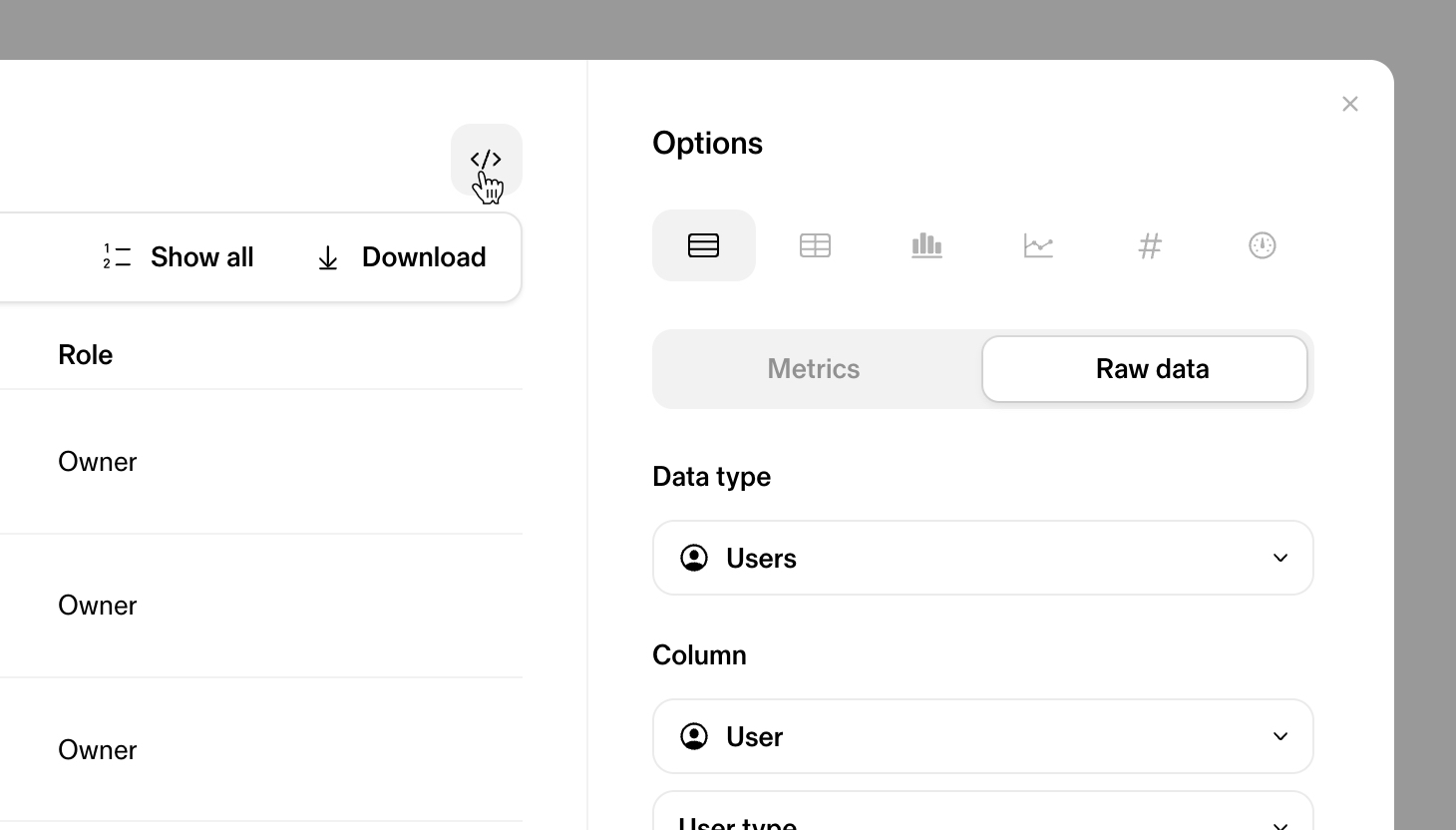
Reports are created using the Insights UI in Sana. Start by navigating to the Insights page at https://<domain>.sana.ai/manage/insights and create a new widget. When the widgets is created, you can choose to copy the query as cURL or as SQL using the developer tools button above the widget as in the image below.
Create a job to generate a report
HTTP Request
POST https://<domain>.sana.ai/api/v1/reports/query
Body Parameters
| Parameter | Description |
|---|---|
| query | The SQL query representing the report |
| format | The format of the report. Possible values: csv, xlsx |
curl "https://<domain>.sana.ai/api/v1/reports/query" \
  -X POST \
  -H "Content-Type: application/json" \
  -H "Authorization: Bearer <token>" \
  -d '{ "query": "SELECT \"user\", \"course\", \"start_date\", \"completion_date\", \"last_progress_date\", \"course_instance\" FROM \"analytics\".\"user_course_instance_progress\" ORDER BY \"user\"", "format": "csv" }'
The above command returns JSON structured like this:
{
  "data": {
    "jobId": "<job-id>",
    "status": "pending",
    "createdAt": "2024-09-04T13:23:30.478732Z",
    "startedAt": null,
    "finishedAt": null,
    "link": null
  },
  "links": null,
  "error": null
}
Get status of a report job
HTTP Request
GET https://<domain>.sana.ai/api/v1/reports/jobs/<job-id>
URL Parameters
| Parameter | Description |
|---|---|
| jobId | The ID of the job |
curl "https://<domain>.sana.ai/api/v1/reports/jobs/<job-id>" \
  -H "Content-Type: application/json" \
  -H "Authorization: Bearer <token>"
The above command returns JSON structured like this:
{
  "data": {
    "jobId": "<job-id>",
    "status": "successful",
    "createdAt": "2024-09-04T13:23:30.478732Z",
    "startedAt": "2024-09-04T13:23:33.029691Z",
    "finishedAt": "2024-09-04T13:23:33.748015Z",
    "link": {
      "url": "<download-url>",
      "expiresAt": "2024-09-04T13:41:31.632324923Z"
    }
  },
  "links": null,
  "error": null
}
xAPI
Sana can act as both an Learning Record Provider or Activity Provider and a Learning Record Store (LRS) in the context of the xAPI specification. This means that an integration with Sana can subscribe to Statements (events) to receive users' activity in Sana, while also allowing external LMS to send the same events to Sana.
Sana as a Record Provider
Status: Disabled by default
This endpoint is disabled by default. Please reach out to your Sana contact to setup this endpoint for your organization in Sana.
Authentication
The xAPI specification states that a client to server integration use the OAuth Client Credentials flow.
In the context of authentication Sana is the client and the integration is the server. This means that the integration must be able to issue tokens to Sana that can be used to send statements.
Request Access token
curl "https://example.com/token" \
  -X POST \
  -H "Content-Type: application/x-www-form-urlencoded" \
  -d "grant_type=client_credentials&client_id=<client-id>&client_secret=<client-secret>&scope=statements/write"
Sana will make a request like above and expect at least the following values to be returned.
{
  "access_token": "<accessToken>",
  "token_type": "bearer",
  "expires_in": "<timeout>"
}
The returned access token will be stored and used for sending statements. Sana will request a new token when the old one has expired or when a request returns 401 or 403 status.
Body Parameters
| Parameter | Description |
|---|---|
| grant_type | Always set to client_credentials |
| client_id | The ID of the client, provided by the integration |
| client_secret | The secret of the client, provided by the integration |
| scope | Defaults to statements/write, a custom scope can be provided in the if required. |
Response Parameters
| Parameter | Description |
|---|---|
| access_token | An access token that can be used by Sana to make send statements |
| token_type | Must be set to bearer |
| expires_in | The number of seconds until the access token expires |
Configuration
xAPI integrations can be configured in https://<domain>.sana.ai/settings/api
After an integration has been created new events will be sent to the integration.
Retry logic
If a statement request fails it will be retried for some period with an exponential backoff. A statement will be retried for 6 days before discarded but the retry period can change in the future without notice.
Requests that return a 2xx status will be treated as successful, any other response will be considered a failure and will result in a retry.
Delivery semantics
Each statement (identified by its id) will be sent at least once. At least once means that the consumer should expect
to process the same statement multiple times (in rare cases). Each statement type defines its own semantics for what is
a unique event.
Statements
The following sections list the supported statements. This list will grow over time, so it's important that the receiving endpoint can handle unknown statements types.
Course completion
Sent when a user completes a course. The user does not have to be assigned to the course for an event to be sent.
A user can have multiple completions for the same course if the course progress has been reset in between.
{
  "id": "c66431c9-60ff-4997-8da6-6522a70e309a",
  "actor": {
    "objectType": "Agent",
    "account": {
      "homePage": "https://sanalabs.com",
      "name": "c4db5d53-3738-4c5d-b400-edad621dbeff"
    }
  },
  "verb": {
    "display": {
      "en-US": "completed"
    },
    "id": "http://adlnet.gov/expapi/verbs/completed"
  },
  "object": {
    "definition": {
      "type": "http://adlnet.gov/expapi/activities/course"
    },
    "id": "rVJIoKPfKLQK",
    "objectType": "Activity"
  },
  "timestamp": "2021-12-15T18:40:53.553743439Z"
}
Path completion
Sent when a user completes a path. The user does not have to be assigned to the path for an event to be sent.
The completion of a path is a derived state from the completion of the courses belonging to a path. This means that the path can be completed multiple times. Either due to an underlying course being completed multiple times or new courses being added to a path.
{
  "id": "c66431c9-60ff-4997-8da6-6522a70e309a",
  "actor": {
    "objectType": "Agent",
    "account": {
      "homePage": "https://sanalabs.com",
      "name": "c4db5d53-3738-4c5d-b400-edad621dbeff"
    }
  },
  "verb": {
    "display": {
      "en-US": "completed"
    },
    "id": "http://adlnet.gov/expapi/verbs/completed"
  },
  "object": {
    "definition": {
      "type": "https://sanalabs.com/xapi/activities/path"
    },
    "id": "th2V7hmRix_7",
    "objectType": "Activity"
  },
  "timestamp": "2021-12-15T18:40:53.553743439Z"
}
Program completion
Sent when a user completes a program. The user have to be assigned to the program for an event to be sent.
The completion of a program is a derived state from the completion of the courses belonging to a program. This means that the program can be completed multiple times. Either due to an underlying course being completed multiple times or user upgraded to newer program versions with different course outline.
{
  "id": "c66431c9-60ff-4997-8da6-6522a70e309a",
  "actor": {
    "objectType": "Agent",
    "account": {
      "homePage": "https://sanalabs.com",
      "name": "c4db5d53-3738-4c5d-b400-edad621dbeff"
    }
  },
  "verb": {
    "display": {
      "en-US": "completed"
    },
    "id": "http://adlnet.gov/expapi/verbs/completed"
  },
  "object": {
    "definition": {
      "type": "https://sanalabs.com/xapi/activities/program"
    },
    "id": "e1e8fcd4-0f98-4c8c-a56e-ecbc6c6e8a67",
    "objectType": "Activity"
  },
  "timestamp": "2024-12-15T18:40:53.553743439Z"
}
Sana as a Record Store
Sana can interface with a third-party LMS to receive activities corresponding to a learner’s progress and completion of a course.
Integration configuration
Each Learning Record Provider that you want to allow to communicate completions back to Sana will have its own configuration guide. However, all of them will ask you to collect the following details:
- OAuth Server URL / Token endpoint URL
- xAPI statement endpoint URL
- Client ID
- Client secret
In order to obtain the last two, please create a new API client for each integration via Manage → API, and take note of the Client ID and Client secret. As for the two necessary endpoints, you can use the following values:
- OAuth Server URL:
https://<domain>.sana.ai/api/oauth/token - xAPI statement endpoint URL:
https://<domain>.sana.ai/xapi/v1/statements
Statements
Sana supports the following statements:
| Progress statement | Complete statement | Actor identifier | Auth mechanism |
|---|---|---|---|
| ✓ | ✓ | Email(mbox) | OAuth 2.0 |
Auth mechanism
Sanna supports OAuth 2.0 Client Credentials flow. Clients can request tokens to Sana to authenticate future request to statements.
Actor identifier
The actor in the xAPI statement needs to be identified using the mbox (i.e., email) property. Sana does not support account objects.
Actor object supported:
{
  "actor": {
    "mbox": "mailto:<mailbox>",
    "objectType": "Agent"
  }
}
Progress course
The progress statement indicates the learner’s progress within a course. In the result object, the completion attribute
needs to be configured as false, and the progress must be set as a percentage of completion (e.g., 75 for 3/4
completion). Sana does not support scaled scores.
Keep in mind that this API only work with courses created via https://<domain>.sana.ai/api/v0/courses (using
externalId); or with courses imported using certain integrations (e.g., LinkedIn Learning).
cURL example to progress a course:
curl -X POST -i \
  https://<domain>.sana.ai/xapi/statements \
  -H 'Authorization: Bearer <bearer_token>' \
  -H 'Connection: close' \
  -H 'Content-Type: application/json' \
  -H 'X-Experience-API-Version: 1.0.0' \
  -d @- << EOF
{
  "id": "85d8ccdd-55a9-4b2c-808e-9c43899b9a9a",
  "timestamp": "2023-02-02T13:15:00.000Z",
  "actor": {
    "mbox": "mailto:<mailbox>",
    "objectType": "Agent"
  },
  "verb": {
    "display": {
      "en-US": "PROGRESSED"
    },
    "id": "http://adlnet.gov/expapi/verbs/progressed"
  },
  "object": {
    "definition": {
      "type": "http://adlnet.gov/expapi/activities/course"
    },
    "id": "<external_course_id>",
    "objectType": "Activity"
  },
  "result": {
    "completion": false,
    "extensions": {
      "https://w3id.org/xapi/cmi5/result/extensions/progress": "10"
    }
  }
}
EOF
Complete course
The completion statement is used to indicate the learner's successful conclusion of a course. In the result object, the
completion attribute needs to be configured as true, and the scaled score must be 100, symbolizing a 100%
completion.
Keep in mind that this API only work with courses created via https://<domain>.sana.ai/api/v0/courses (using
externalId); or with courses imported using certain integrations (e.g., LinkedIn Learning).
cURL example to complete a course:
curl -X POST -i \
  https://<domain>.sana.ai/xapi/statements \
  -H 'Authorization: Bearer <bearer_token>' \
  -H 'Connection: close' \
  -H 'Content-Type: application/json' \
  -H 'X-Experience-API-Version: 1.0.0' \
  -d @- << EOF
{
  "id": "88abd221-44b7-4e08-954b-e457e4699f3b",
  "timestamp": "2023-02-02T14:30:00.000Z",
  "actor": {
    "mbox": "mailto:<mailbox>",
    "objectType": "Agent"
  },
  "verb": {
    "display": {
      "en-US": "COMPLETED"
    },
    "id": "http://adlnet.gov/expapi/verbs/completed"
  },
  "object": {
    "definition": {
      "type": "http://adlnet.gov/expapi/activities/course"
    },
    "id": "<course_uri>",
    "objectType": "Activity"
  },
  "result": {
    "duration": "PT1H27M",
    "completion": true,
    "extensions": {
      "https://w3id.org/xapi/cmi5/result/extensions/progress": "100"
    }
  }
}
EOF